
Payabli allows homeowners to make payments directly through the SmartWebs Resident Portal.
Before payments can be accepted, the Property Management Company (PMC) must complete a one-time Payabli onboarding and compliance review. Once the PMC is approved, the HOA associations managed by the PMC can be activated without each HOA completing a separate underwriting application.
Start the Payabli Application in Smartwebs
The Payabli onboarding process begins in Smartwebs. From Smartwebs, the PMC will submit its information and receive an email from Payabli with instructions for completing the application.
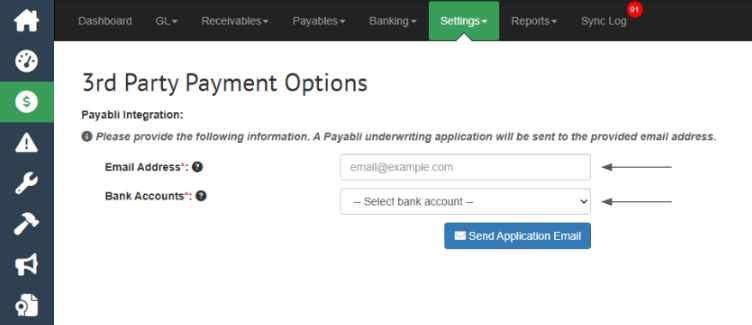
- In Smartwebs, go to Accounting > Settings > 3rd Party Payment Options.
- Enter the email address that should be associated with the Payabli application.
- Select the bank accounts you want to be available for payment processing.
- Click Send Application Email.
Payabli will send an email to the designated email address with credentials and instructions for accessing the Payabli Portal.
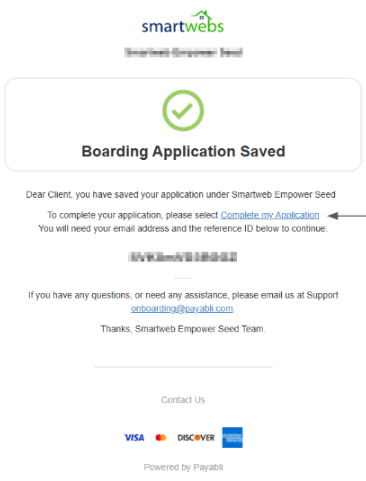
The authorized signer will then complete Payabli's standard KYC/KYB compliance review:
- KYC (Know Your Customer): Verification of the authorized signer and applicable business owners.
- KYB (Know Your Business): Verification that the PMC is a legitimate, registered business entity.
Important: The application is initiated in Smartwebs, but the PMC will complete the Payabli onboarding and compliance application through the Payabli Portal.
Information the PMC Should Have Ready
Signer/Owner Information
- Valid, non-expired government-issued photo ID
- Full legal name
- Date of birth
- Residential address — no P.O. Boxes
- For-profit businesses: information for all owners with 25% or more ownership
- Non-profits: the authorized signer is verified as the controlling person
Business Information
- Legal business name exactly as it appears with the IRS
- EIN/Tax ID
- Physical business address
- State of formation and registration status
- IRS SS-4 letter if there is a question about the EIN
Financial Information
- 3 months of business bank statements for most PMCs
- 6 months of statements if monthly processing volume exceeds $300,000
- Full financials if volume exceeds $750,000
- Estimated monthly processing volume
- Average transaction amount
- Expected highest transaction amount
Important: Non-Profit Organizations
If your PMC is organized as a non-profit, the ownership requirements are different because non-profits do not have owners.
The individual signing the application is verified as the controlling person. Non-profit organizations should also have the following ready for review:
- IRS determination/exemption letter
- Articles of Incorporation
- Current officer or board list
Bulk Onboarding for PMCs with Multiple Associations
If the PMC manages multiple associations, Payabli can onboard the associations in bulk during the initial onboarding process.
This means the PMC does not need to complete a separate full Payabli underwriting application for each HOA.
Monitor Application Status in Smartwebs
Smartwebs will display the status of the Payabli application so the PMC can monitor its progress.
Once the application has been Approved, the PMC can also edit the payment timing in Smartwebs. Payment timing determines when the payment is sent to the vendor.
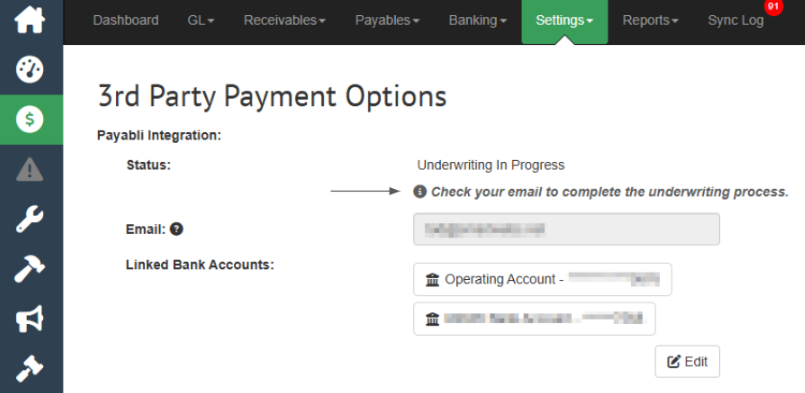
Once Payabli has completed the underwriting and compliance review, the status will update to Active.
When the status displays Active, the PMC can move forward with configuring payment settings for each association.
At this point, the payment timing can be customized per association, allowing the PMC to determine when payments collected through Payabli are sent to the vendor.
- In Smartwebs, navigate to Accounting > Setttngs > 3rd Party Payment Options
- Locate the Payment Timing setting.
- Select the desired payment timing for that association.
- Save your changes.

Once the payment timing has been configured, the association is ready to begin accepting payments through the Smartwebs Resident Portal.
|
Step |
Typical Timeline |
|
PMC Application Review |
1–3 business days for a complete submission |
|
Conditional Approval/Additional Information |
Depends on how quickly requested information is provided |
|
HOA Community Activation |
1–2 business days after PMC approval and HOA information is submitted |
Before submitting your information, double-check:
- The signer's date of birth is correct.
- The EIN is entered as 9 digits without dashes.
- Physical addresses are used instead of P.O. Boxes.
- Required identification information is complete.
- All required financial documents are included.
- Each HOA has its own EIN.
- Any significant upcoming special assessments have been disclosed.
Providing complete and accurate information up front is the fastest way to move through the Payabli review and community activation process.