
is guide outlines the layout options available in the Smartwebs Lifestyles module. Each layout is designed to help you organize content effectively while maintaining a consistent header and footer across your site.
Available Layouts
1. Left-Main
This layout provides a structured, two-column approach.
- Structure: Features a dedicated sidebar on the left for navigation or secondary details, with a larger primary content area on the right.
- Best For: Pages requiring a table of contents, quick links, or filtered categories alongside main text.
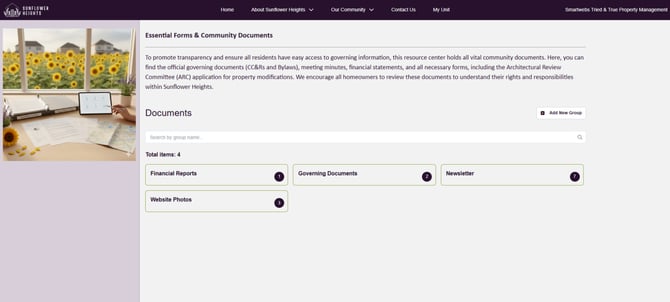
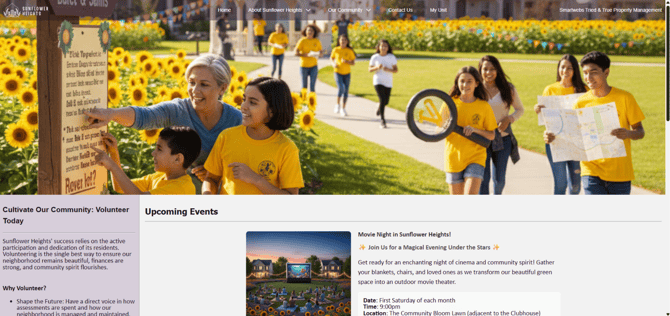
2. Top Image - Left - Main
A dynamic, multi-section layout designed for visual impact and organization.
- Structure: Includes a full-width header (supporting static images, rotating banners, or video) followed by a side-by-side split (Left and Main) below.
- Best For: Landing pages or featured sections where you want to lead with strong visuals before diving into detailed information.
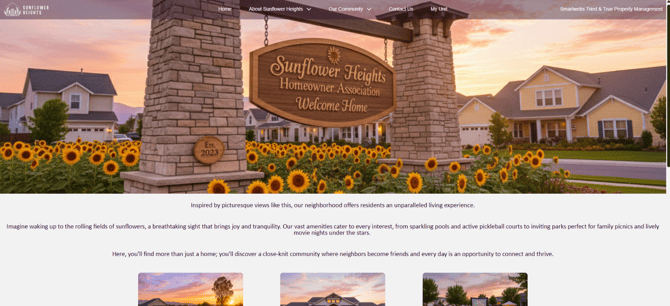
3. Top Image - Main
A classic, high-clarity layout that prioritizes a single flow of information.
- Structure: Features a prominent full-width static images, rotating banners, or video at the top, with one continuous content area underneath.
- Best For: Homepages or "About Us" sections where you want to highlight a hero image and then present a unified message.
4. Main
A streamlined, single-column layout for maximum focus.
- Structure: One powerful main content area that spans the width of the page.
- Best For: Long-form articles, detailed announcements, or any page where you want the reader’s attention entirely on the central information without distractions.
