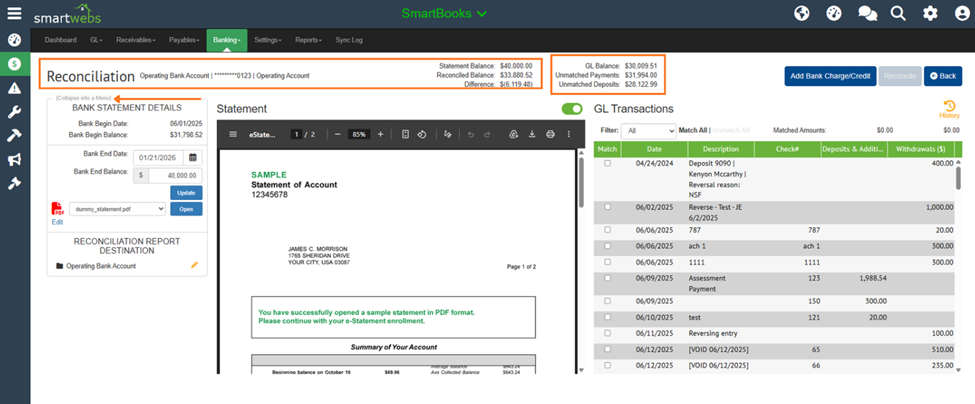
We’ve overhauled the layout of the bank reconciliation screen to maximize visibility and streamline your workflow. Here is a summary of the key changes:
-
Header Changes
-
Bank Account Name: Now located in the top-left corner (previously centered) for easier identification.
-
Reconciliation Stats: The Statement Balance, Reconciled Balance, GL Balance, and Unmatched Payments/Deposits have moved to the top center of the page for a quick health check.
-
New "Difference" Label: We have explicitly added a "Difference" description next to the amount representing the variance between your Statement Ending Balance and Reconciled Balance.
-
-
Enhanced Workspace & Visibility
-
Expanded Grid: The Statement and GL Transaction areas have been moved further up the screen, reducing the need for excessive scrolling and providing more room for your data.
-
Collapsible Side Panel: You can now collapse the bank statement details into a side menu to create a split-screen view, allowing for better focus on your GL transactions.
-
Matched Transactions: Both Matched Payments and Matched Deposits are now conveniently located within the GL Transactions area.
-