
If you have switched operating bank accounts or replaced a current one, you must update your Default GL Codes to ensure that lockbox payments are accurately recorded in your ledger.
Follow these steps to update your settings:
How to Update Your Operating Bank Account
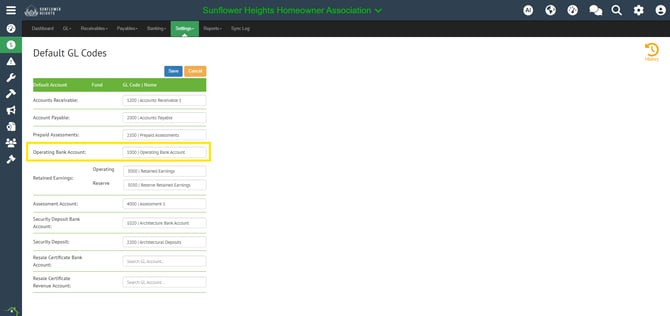
- Navigate to Default GL Codes: Log in to your portal and navigate to Accounting > Settings > Default GL Codes.
- Locate the Bank Account Field: Click Edit and look for the field labeled Operating Bank Account.
- Update the GL Code: Select the new General Ledger code associated with your new bank account from the dropdown menu.
- Save Your Changes: Ensure you click Save to apply the changes.
Why is this step necessary?
Updating the Default GL Code ensures that when a lockbox file is processed, the system automatically points the entry to the correct bank account. If this is not updated, your financial reports will reflect deposits in the old account, leading to reconciliation discrepancies.