
When you receive the following warning while operating a Smartwebs App:
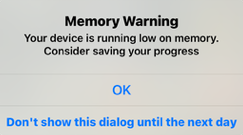
It refers to your device's active memory (RAM) and is not related to your storage space or the functions of the app itself.
To avoid this warning:
1. Close other apps running in the background before using Smartwebs
2. Restart your device occasionally to clear RAM
3. The warning is just a heads-up - you can tap OK and continue working
4. Tap 'Don't show this dialog until the next day' if it's annoying
The warning doesn't prevent you from taking photos. It is a precautionary message.