
Q: How do I manually configure a Late Fee Schedule in Smartwebs?
A: If your schedule is configured as Manual, you must run it when you want late fees assessed.
-
Navigate to Accounting.
-
Select Collections.
-
Open Late Fee Schedule.
-
Click Run Schedule.
-
Review the accounts that meet the criteria.
-
Confirm to apply the late fees.
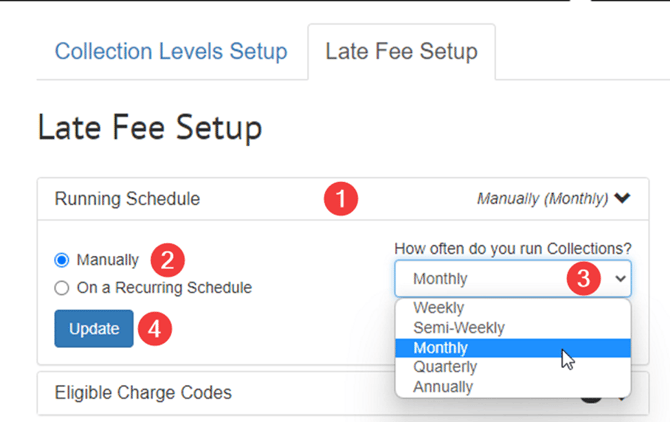
After the schedule is configured, define the conditions under which late fees are applied.
-
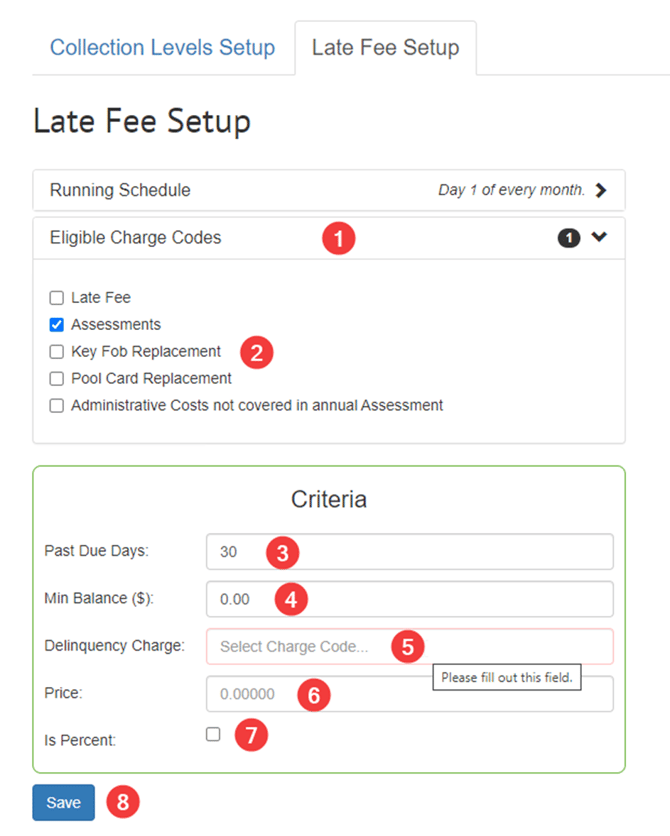
Click the Eligible Charge Codes bar.
-
Select the Eligible Charge Code(s).
-
Enter the number of Past Due Days required before the fee is assessed.
-
Enter the Minimum Balance required to trigger the late fee.
-
Enter the Delinquency Charge code that will be applied.
-
Enter the Price of the late fee.
-
Check Is Percent if the fee should be calculated as a percentage of the balance rather than a fixed dollar amount.
-
Click Save.
Best Practices
-
Ensure eligible charge codes align with the association’s governing documents and late fee policy.
-
Verify the delinquency charge code is configured correctly before enabling the schedule.
-
Confirm the Past Due Days setting matches the association’s collections timeline.
-
Test the configuration using a small sample of delinquent accounts before applying the schedule across the entire association.
-
Review an account ledger after the first run to confirm the late fee posts as expected.